Category: CST 338

Software Design

  • CST 338: Week 7/8

    Looking back on the HW1 assignment, I would probably approach this assignment in a similar way. Now that I have a better understanding of the game’s mechanics, however, I would implement some things differently. Although it wasn’t part of the assignment, creating a game with a Java Swing UI would be a fun challenge. Hangman is a visual game with simple graphical components, so it shouldn’t be too difficult to make a UI for it.

    The thing I enjoyed most about this course was learning Kotlin. It’s a modern, expressive, multi-paradigm programming language, which allows for more flexibility than Java. Kotlin supports most Java language features, with a few exceptions, making it possible to follow both object-oriented and functional programming paradigms when designing an application.

    I also learned a lot about Android development. Learning how to use Jetpack Compose has been pretty intuitive for me, since I’m already familiar with React. Before this course, I hadn’t done much native programming for mobile devices, having mostly focused on web development, so it was great to learn more about this area of software development. Maybe I’ll learn Swift next, since I have an iPhone, or spend some more time learning React Native to target Android and iOS.

    Overall, this course has been helpful for learning more about software development and design patterns. There are a ton of resources for learning more, like Node.js Design Patterns and Patterns.dev. I’ll make sure to spend some more time continuing to learn about this topic.
  • CST 338: Week 5

    I reviewed Glenn’s code for the Markov assignment. Glenn’s strategy was to first implement methods that didn’t call any other methods, then implement the methods that called those methods, which makes sense, since you can make sure the methods without any dependencies work before implementing the methods that call other methods.

    My strategy was to first scaffold out the code according to the documentation, so that everything was syntactically correct. From there, I implemented the logic as it was described in the documentation, focusing on getting the tests to pass. After that, I reviewed the documentation again and checked the output to make sure it made sense.

    I think both of our strategies are reasonable for this assignment. Glenn’s code follows the Google Java Style Guide, and so does my code.

    I also worked on developing an Android app this week using Kotlin, which is Google’s recommended language for Android development, and I’ve been liking it so far. I’m finding Kotlin to be more expressive than Java, similar to TypeScript, which is my go-to programming language. Kotlin also works with Java, so both languages can work together in the same project.

    Kotlin appears to be gaining more traction in recent years, so it could be a good language to learn.

  • CST 338: Week 4

    Project 1 Code Review

    I reviewed code from Glenn and Jack for Project 1. One of the first things I noticed from reviewing my teammates’ code was that I overlooked implementing a method in my own code. All of the tests passed on my code, and it seemed like everything was working correctly, but I guess that one slipped by me. It’s helpful to work with a team for this reason, since one person will often see what another person might miss. Other than that, we all completed the assignment and wrote code in a clear and understandable way.

    Another thing I did differently was to handle the resistance between between ElementalTypes with a matrix, since the values were given as a table, so a matrix made sense. I also simplified the constructor and setPhrase function a bit to avoid leaking this out of the constructor.

    My general strategy for approaching this assignment was to first read the documentation, then scaffold out out the classes and resolve any syntax errors so that the code would compile. From there, I worked on implementing the logic as it was described in the documentation, focusing on getting the tests to pass. After all the tests were passing, I reviewed the output from the tests to make sure it made sense, then cleaned up the code a bit and added some javadocs.

    My teammates described their strategies as follows:

    I just did what make sense to me at the moment and skip that I don’t get quickly. If I ran into a method that uses another method, I stop and try to do the other method first. Basically I’m solving methods that doesn’t need other method because it makes more sense to me workflow wise. I also try to debug and step into code anytime I can. That all I can think of.

    – Glenn

    When solving this assignment, I tried my best to follow the documentation and understand why certain tests didn’t pass. I would try different approaches until I figured out what worked and didn’t work.

    – Jack

    I think my strategy worked for the most part, but in the future, I’ll make sure to review the documentation again, even after the tests are passing, to catch anything that may have been overlooked. I used an automated Google Java Style Guide formatter, and my teammates’ code also appears to follow the Google Java Style Guide.

    The most challenging part of this project was probably understanding and implementing the Monster battle mechanics, but it was also the most interesting. It might help to create a state diagram to explain how everything should work together.

    Overall, I’m proud of completing this project by implementing code that is clear and concise, while learning more about object-oriented software design in the process. I didn’t do anything to celebrate for this project, but I will be sure to celebrate after the next project, especially since it’s the final project before the holiday break. Maybe I’ll buy a new bike for Christmas, or use the time to work on some personal projects.

  • CST 338: Week 3

    Code Review

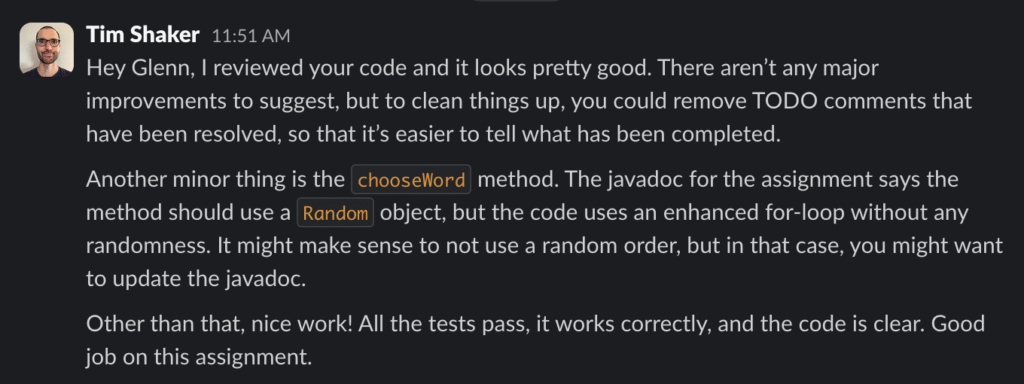
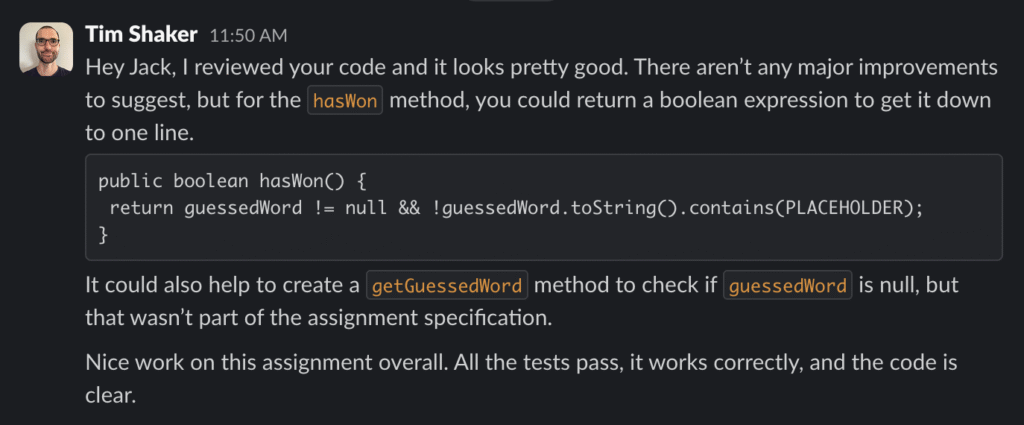
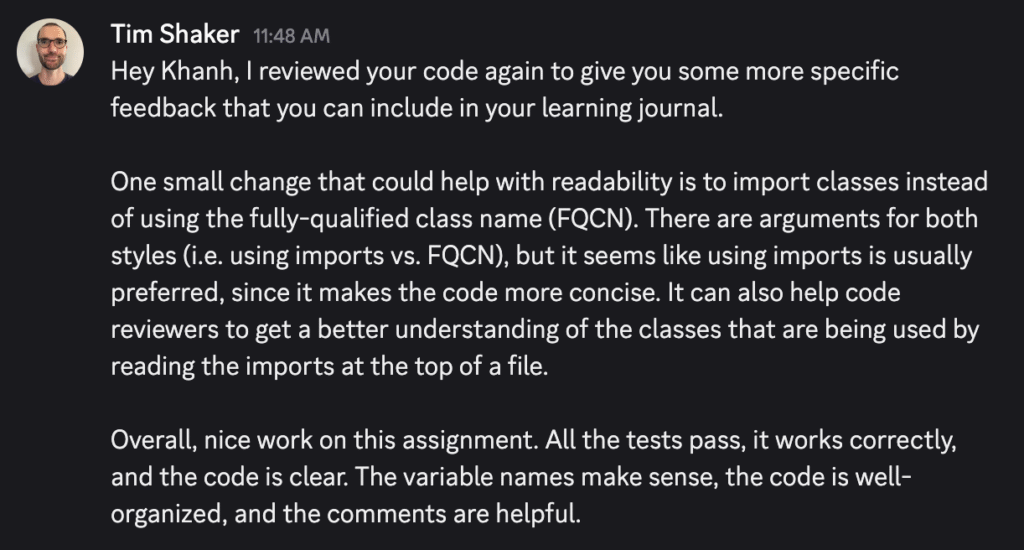
    I reviewed code from Khanh, Glenn, and Jack for the Hangman assignment. There weren’t many major improvements to be made. The assignment was fairly straightforward, so we all followed the instructions and produced similar code. Here are the reviews I shared with my classmates:

    Here are some positive trends I noticed about the code I reviewed:

    1. All of the tests passed, and the game worked correctly with each student’s code.
    2. Adding a conditional to check if a variable is null or a List is empty. It’s important to do this to prevent runtime errors.
    3. Using a do-while loop in the chooseWord method. This makes sense because the loop may or may not need to repeat, depending on if the randomly selected word has been guessed already.

    There is always room for some improvement though. Here are a couple things I noticed that could be improved:

    1. Throwing an error with more specific messages, to help debugging.
    2. Making sure to remove TODO comments once they are resolved.
    3. Using imports instead of fully-qualified class names (FQCNs).

    The reviews I received from my classmates were generally positive. One reviewer mentioned that I could improve my code’s comments by including them throughout the code instead of just using javadoc comments. I agree that it can often be helpful to have comments in code to explain specific parts.

    Takeaways

    I think the hardest part of this assignment was just wrapping my head around the documentation and how the code is supposed to function. The biggest victory from the assignment for me was developing the practical skill of onboarding to a new codebase. Onboarding to an unfamiliar codebase can often be a challenge, but once you get the hang of it, you can develop strategies to make it easier.

    For example, one thing I’ll do is to make sure the code is syntactically correct before implementing any logic. Fixing the syntax errors will usually allow the code to compile, which is always a step in the right direction. From there, it’s a lot easier to focus on getting the tests to pass and following the assignment’s instructions on how to implement the code.

    One thing that could help make the code more testable is to have the Hangman class handle its own input, instead of having a separate GameLoader class handle input. Being able to test the entire game end-to-end within a single class would make it easier to verify the complete functionality of the game, so that any issues would be isolated to a single class.

  • CST 338: Week 2

    This week, we worked on a few Java projects to better understand OOP concepts. The four pillars of object-oriented programming (OOP) are abstraction, encapsulation, inheritance, and polymorphism, which help to keep code modular, reusable, secure, and maintainable, among other benefits.

    1. Abstraction describes the process of hiding complex implementation details and exposing only the necessary features of an object. For example, we designed a Shape interface that exposes an abstract getArea function to be implemented by concrete classes.
    2. Encapsulation allows an object to control and restrict access to its own internal state. For example, we developed a simple Hangman game, which used private fields to keep track of the state of the game, like the secretWord that the user tries to guess.
    3. Inheritance is the process whereby a subclass can acquire properties and methods from a superclass. For example, we worked on a Pokémon-style game, where different types of subclasses inherit properties from a Monster superclass.
    4. Polymorphism means “many forms” and describes how a common interface can behave differently depending on the object to which it is being applied. For example, the different Monster subclasses have common methods that behave differently, depending on which kind of Monster is being used.

    We also practiced some software development techniques this week, like test-driven development (TDD) and version control with Git. We used TDD to implement our Java projects according to tests and specifications included with the assignment, in addition to writing our own tests with JUnit. To keep track of changes we made to our repositories, we used the GitHub flow, which involves working on a new feature branch created from the main branch, opening a pull request to merge changes, and then merging the new changes back into the main branch.

  • CST 338: Week 1

    This week for our Software Design class, we got our Java development environments set up and worked on some coding exercises using CodingBat.

    We started with some straightforward code challenges and then moved on to more difficult ones. I’ve taken a Java course before and have used Java to solve LeetCode problems, so some of these problems were familiar. The hardest part was probably remembering Java syntax and methods, since it’s been awhile since I’ve used the language.

    To solve the problems, the first thing I would do is get the code to compile by returning the correct type. For example, if the function is supposed to return a String, I would just have it return an empty String. On CodingBat, this displays all the test cases, which helps with getting an idea of how to solve the problem and figuring out which edge cases to consider.

    For simpler problems, I would just start coding out the solution, but for more complex problems, it’s helpful to follow a structured approach. George Pólya’s How to Solve It presents a helpful problem solving framework that can be remembered as UPER:

    1. Understand the problem
    2. Plan a solution
    3. Execute the solution
    4. Review and revise

    I was able to solve many of the easier problems on the first try, while harder problems took a bit more effort. I set up a Java development environment on my local machine to debug and step through harder problems, which made it easier to see what the issue was.